

10 Best Open Source Email Marketing Software for 2026

Best Open Source Email Marketing Software Shortlist


Open source email marketing software gives you the flexibility to run effective campaigns without locking yourself into expensive, rigid platforms. If you’re managing tight budgets, complex requirements, or just want more control over how your emails are built and delivered, these tools can offer serious value.
With 10 years of experience leading marketing teams, and using our in-house review methodology, I’ve tested and shortlisted the top open source platforms that balance customization, scalability, and usability. This guide breaks down the best options to help you build smarter, more efficient campaigns that align with your goals.
Why Trust Our Software Recommendations
Our team has been testing and reviewing software since 2012. As marketing leaders ourselves, we know how difficult—and important—it is to choose the right software.
For this guide, we evaluated tools using hands-on testing and independent research, scoring tools using our selection criteria.
Our reviews reflect our human editorial judgment, not a sales pitch.
Open Source Email Marketing Software Comparison Table
This comparison table summarizes pricing details for my top open source email marketing software selections.
| Tool | Best For | Trial Info | Price | ||
|---|---|---|---|---|---|
| 1 | Best for integrated business solutions | Free plan + free trial available | From $11.20/user/month (billed annually) | Website | |
| 2 | Best for large-scale email campaigns | Free plan available | From $1/user/month (billed annually) | Website | |
| 3 | Best for high-performance bulk messaging | Free demo available | Free (open source) | Website | |
| 4 | Best for managing large subscriber lists | Free demo available | Pricing upon request | Website | |
| 5 | Best for WordPress Integration | Free plan available | From $77/user/year (billed annually) | Website | |
| 6 | Best for cost-effective email marketing | Free demo available | From $1 per 10,000 emails (self-hosted) | Website | |
| 7 | Best for small businesses and nonprofits | Free plan + free demo available | From $150 (billed annually) | Website | |
| 8 | Best for multi-client management | Free demo available | Free | Website | |
| 9 | Best for privacy-focused email campaigns | Free plan available | From $8/month | Website | |
| 10 | Best for single-solution email management | Free plan available | From $0.001/email | Website |
Best Open Source Email Marketing Software Reviews
Below are my detailed summaries of the best open source email marketing software that made it onto my shortlist. My reviews offer a detailed look at the key features, pros & cons, integrations, and ideal use cases of each tool to help you find the best one for you.

Best for integrated business solutions

My Evaluation Score
- Analytics & Tracking
- Strong
- Email Template Editor
- Strong
- Open Source Licensing
- Adequate
- Campaign Creation & Sending
- Strong
- Subscriber & List Management
- Strong
- SMTP/Email Delivery Integration
- Strong
Odoo Email Marketing is on this list because it does something most open source platforms don’t: it connects email campaigns directly to an entire suite of business apps. I keep turning to Odoo when a team needs marketing to interact closely with sales, CRM, or even inventory, all in the same database.
It stands out for the way you can build email automations that pull in real operational data—from customer touchpoints to purchase activity—without exporting or syncing. I really appreciate how easy it is to trigger campaigns based on activities in other Odoo modules. This works best for businesses that want everything, including marketing, to run as part of a tightly integrated system.
Odoo Email Marketing’s Best For
- Businesses running multiple Odoo apps that need unified email and operational workflows
- Companies wanting to automate campaigns triggered by real-time data across sales, CRM, or inventory
Odoo Email Marketing’s Not Great For
- Teams who just need simple email campaigns without broader system integrations
- Marketers seeking advanced stand-alone analytics or design-heavy email features
What Sets Odoo Email Marketing Apart
Odoo Email Marketing stands out for how seamlessly it folds email campaigns into broader business operations, rather than treating marketing as something separate. When I compare it to tools like Constant Contact, it feels less like an isolated marketing channel and more like a piece of the operational engine—automation, triggers, and lists are all rooted in what’s happening elsewhere in the business.
Odoo expects teams to treat marketing as fully integrated with sales, inventory, CRM, and workflow—not just as a channel to blast newsletters. In practice, this means you’re often building campaigns that react to real transactional events, updating in sync with customer lifecycle changes tracked across the rest of your system.
Tradeoffs with Odoo Email Marketing
Odoo really optimizes for deep, system-wide integration at the expense of email channel depth. What usually happens is that advanced marketers miss specialized email-only features or fine-tuned analytics you’d find in standalone platforms, since Odoo expects everything to run within its broader business stack.
Pros and Cons
Pros:
- Automation features streamline scheduling and campaign personalization.
- Real-time analytics provide detailed insights into campaign performance.
- Drag-and-drop interface simplifies the creation of professional emails.
Cons:
- Some users report delays in receiving customer support assistance.
- Limited creative customization options in the email editor.

phpList
Best for large-scale email campaigns

My Evaluation Score
- Analytics & Tracking
- Strong
- Email Template Editor
- Adequate
- Open Source Licensing
- Strong
- Campaign Creation & Sending
- Strong
- Subscriber & List Management
- Excels
- SMTP/Email Delivery Integration
- Strong
phpList makes my shortlist because it changes the game for anyone running campaigns at scale with open source tools. I recommend it when campaign volume and advanced list segmentation outgrow basic solutions and you need reliable deliverability controls.
What I appreciate about phpList is how it handles massive subscriber lists, throttle settings for high delivery volume, and flexible campaign scheduling. I’ve watched teams with complex audience targeting run millions of messages without the tool buckling under the pressure.
phpList’s Best For
- Organizations sending high-volume email campaigns to complex, segmented lists
- Teams that need deliverability controls and advanced scheduling in an open source platform
phpList’s Not Great For
- Marketers who want drag-and-drop automation builders or modern design tools
- Small groups running only basic or infrequent email campaigns
What Sets phpList Apart
phpList approaches email marketing with a focus on sheer sending scale and subscriber management depth, not visual design or all-in-one campaign building. Instead of wrapping everything in a WYSIWYG interface like Mailchimp or Brevo, phpList assumes you already have your content and segments, and just need granular control over message delivery, permissions, and scheduling.
Unlike more modern, drag-and-drop email tools, phpList expects you to treat campaigns as data-driven operations. The workflow caters to teams who need to run high-volume, rules-based messaging—think civic organizations, universities, or advocacy groups that manage sprawling lists and want exact control over how and when emails land.
Tradeoffs with phpList
Because phpList is built to optimize for deliverability at massive scale, the hands-on, technical setup puts the burden on teams to handle their own templating and user management. What usually happens is design flexibility and built-in analytics take a backseat, so visually-driven marketers or creative teams will find themselves limited.
Pros and Cons
Pros:
- Hosted solution option
- Community-driven development
- Handles large email volumes
Cons:
- No built-in CRM features
- Basic support resources


My Evaluation Score
- Analytics & Tracking
- Strong
- Email Template Editor
- Strong
- Open Source Licensing
- Excels
- Campaign Creation & Sending
- Adequate
- Subscriber & List Management
- Excels
- SMTP/Email Delivery Integration
- Excels
Listmonk earns its spot for teams that don't just dabble in email, but run high-volume campaigns where message delivery speed and scale are core requirements. I reach for it when the team wants to self-host and prioritize full visibility, especially around throughput and control.
Where Listmonk truly stands out for me is its ability to process and deliver millions of emails with strong performance thanks to its Go-based backend, rich templating, and instant campaign previews. I appreciate how it lets you manage subscriber lists using SQL-like queries and analyze delivery in real time, which fits well if you want a data-driven, high-performance workflow.
Listmonk’s Best For
- Tech-savvy marketing teams needing self-hosted, high-volume bulk email delivery
- Businesses that want granular control over subscriber management with detailed tracking and analytics
Listmonk’s Not Great For
- Non-technical teams that need visual campaign builders or hand-holding setup
- Organizations looking for advanced CRM, automation, or drag-and-drop design tools in one package
What Sets Listmonk Apart
Listmonk approaches email marketing with the mindset of a developer or ops team, building from the ground up for raw performance and full data control. Unlike cloud-first tools like Mailchimp, it expects you to own and run the system, using a SQL-like interface for segmenting subscribers and real-time delivery stats that are rarely this exposed in other tools.
Instead of trying to pack in automation builders or design-heavy features, Listmonk is all about throughput, transparency, and letting you get hands-on with your lists and message logic. I see it thrive in environments where the bulk send is the main event, and when technical flexibility outweighs convenience.
Tradeoffs with Listmonk
In pushing for performance and deep control, Listmonk gives up a lot of onboarding help and visual tooling. What usually happens is teams without technical know-how struggle to set up or customize, so if you don’t have someone comfortable with server setup or SQL-like queries, you may hit roadblocks early.
Pros and Cons
Pros:
- Built-in dashboard for metrics
- SQL-based segmentation
- Easy to install and deploy
Cons:
- UI may feel basic
- Limited built-in templates


My Evaluation Score
- Analytics & Tracking
- Strong
- Email Template Editor
- Strong
- Open Source Licensing
- Adequate
- Campaign Creation & Sending
- Strong
- Subscriber & List Management
- Strong
- SMTP/Email Delivery Integration
- Excels
Mailtrain makes my shortlist because it’s rare to find a fully open source email marketing platform that handles large subscriber bases without buckling. When I see teams managing tens or hundreds of thousands of contacts, especially for high-volume newsletters or association comms, this is the tool that keeps things moving.
What stands out in practice is how Mailtrain lets you segment huge lists, schedule recurring campaigns, and run subscription forms you fully control. I really appreciate never worrying about subscriber limits—when scale is your problem, this is what I recommend.
Mailtrain’s Best For
- Organizations managing large subscriber lists where self-hosting and data control matter
- Email marketers who need advanced list segmentation and recurring campaign scheduling at scale
Mailtrain’s Not Great For
- Teams that want built-in integrations with modern SaaS marketing stacks
- Marketers looking for drag-and-drop email builders or rich visual design tools
What Sets Mailtrain Apart
Mailtrain approaches email marketing from a technical, self-hosted angle, expecting teams to value independence and granular control over their infrastructure. Instead of focusing on user-friendly drag-and-drop interfaces like Sendinblue, Mailtrain assumes you’ll bring some technical skill and want to customize subscriber management, automations, and data access yourself.
It treats large list handling as a first-class need rather than a premium feature—where most big-name platforms penalize scale, Mailtrain empowers you to own the entire process without arbitrary limits.
Tradeoffs with Mailtrain
Mailtrain optimizes for control and scalability over accessibility and polish. What usually happens is, if you don’t have technical resources or want polished templates and built-in guides, the learning curve and time investment can feel steep.
Pros and Cons
Pros:
- Supports multiple sending providers
- Customizable list segmentation
- Handles large subscriber lists
Cons:
- Basic user interface
- Limited third-party integrations


My Evaluation Score
- Analytics & Tracking
- Strong
- Email Template Editor
- Strong
- Open Source Licensing
- Minimal
- Campaign Creation & Sending
- Strong
- Subscriber & List Management
- Excels
- SMTP/Email Delivery Integration
- Strong
FluentCRM earns a spot here because it’s really built for anyone who needs deep, native WordPress integration for email marketing. I usually recommend it when a team wants lists, automations, and email campaigns running directly inside their WordPress site and not in some outside tool.
When I installed FluentCRM for a membership community, I liked how it let me segment contacts by user roles and run sequences based on site activity. I think it stands out for fully using WordPress’s user data and automation triggers—this is really where other open source email tools fall short.
FluentCRM’s Best For
- WordPress site owners who want in-dashboard email marketing and automation
- Membership sites or online courses needing segmentation by WordPress user roles
FluentCRM’s Not Great For
- Teams running marketing across multiple sites, platforms, or channels beyond WordPress
- Organizations that need advanced deliverability analytics or multi-channel campaign tools
What Sets FluentCRM Apart
FluentCRM feels unique because it doesn’t try to replace your whole marketing stack—it expects your work to happen inside WordPress. The whole system is not just integrated but built around using native WordPress data, triggers, and logged-in user actions as the backbone for automations.
Unlike something like Sendy or Mailtrain, which tend to sit outside your site and just connect through APIs, I find FluentCRM's approach makes campaigns and segmentation feel seamless for anyone living in the WordPress dashboard. It’s really optimized for teams who see their site itself as the hub, not just another channel.
Tradeoffs with FluentCRM
FluentCRM leans all-in on the WordPress-centered workflow, so what breaks is its value once you step outside that ecosystem. If your marketing expands to Shopify, headless CMS, or stand-alone e-commerce, you’re going to hit some real limitations.
Pros and Cons
Pros:
- Seamless integration with WordPress enhances user convenience.
- Advanced automation workflows streamline marketing efforts.
- Detailed analytics provide insights into campaign performance.
Cons:
- Requires a WordPress environment to operate.
- Initial setup can be complex for non-technical users.


My Evaluation Score
- Analytics & Tracking
- Strong
- Email Template Editor
- Strong
- Open Source Licensing
- Limited
- Campaign Creation & Sending
- Adequate
- Subscriber & List Management
- Strong
- SMTP/Email Delivery Integration
- Strong
I picked Sendy for this list because it delivers on cost-effective email marketing in a way very few open source options do. When teams need full control over their sending and want to avoid the recurring costs of mainstream SaaS platforms, Sendy stands out immediately.
What I appreciate most is how Sendy integrates with Amazon SES, so every campaign we launch is genuinely affordable at large scale. The ability to track detailed reports on opens and clicks without the usual markup is a huge plus when your list grows above 10,000 contacts.
Sendy's Best For
- Teams who want to self-host and keep email marketing costs under control
- Marketers who need detailed campaign reporting and Amazon SES integration
Sendy's Not Great For
- Organizations that want built-in email design tools and drag-and-drop editors
- Teams looking for hands-off cloud infrastructure and minimal server management
What Sets Sendy Apart
What stands out to me about Sendy is how plainly it treats email sending as infrastructure rather than a fully managed service. Unlike something like Constant Contact, which handles everything for you, Sendy expects you to control where your emails are sent from and gives you real ownership over your subscriber data.
Instead of emphasizing feature bloat or glossy templates, it’s laser-focused on tying your campaigns tightly to Amazon SES—so you always know what’s happening under the hood. Teams tend to treat email marketing with more technical rigor and transparency when using Sendy, which can be a big shift from the hand-holding and abstraction you see in the big SaaS providers.
Tradeoffs with Sendy
Sendy optimizes for transparency and cost control, but what often breaks is convenience—the customization and hands-on server setup take real effort up front. In practice, teams are responsible for deliverability and security, which adds ongoing work you just don’t have with conventional hosted platforms.
Pros and Cons
Pros:
- Detailed campaign reporting
- High deliverability rates
- Supports multiple brand management
Cons:
- No built-in CRM functionality
- Limited third-party integrations


My Evaluation Score
- Analytics & Tracking
- Strong
- Email Template Editor
- Adequate
- Open Source Licensing
- Adequate
- Campaign Creation & Sending
- Strong
- Subscriber & List Management
- Strong
- SMTP/Email Delivery Integration
- Strong
Dada Mail is always on my shortlist for open source email marketing because it gives small businesses and nonprofits tight control over subscriber management. I like how it keeps everything list-based—managing opt-ins, tracking bounces, and automating digests with real clarity.
Where Dada Mail shines for me is with its archiving features and detailed email tracking. I see small teams using it when they want a totally self-hosted system that’s simple but offers strong list hygiene and transparency in campaign results.
Dada Mail’s Best For
- Small businesses and nonprofits managing in-house subscriber lists
- Teams wanting a self-hosted email system with strong list control
Dada Mail’s Not Great For
- Marketers who need complex automations or advanced segmentation
- Organizations that require native integrations with CRMs or ecommerce platforms
What Sets Dada Mail Apart
What strikes me about Dada Mail is how much it centers everything around email lists—ownership, management, and all the tools are deliberately built to support that. Unlike mainstream SaaS platforms like Mailchimp, which treat campaigns as the hub, Dada Mail expects you to work directly on your server and manage subscribers on your own terms.
You don’t get heavy visual builders or campaign wizards; instead, you get focused tools for list control, detailed archiving, and digest management. It’s very much designed for teams who want hands-on, local control without the distractions of broader marketing automation.
Tradeoffs with Dada Mail
Because it optimizes for hands-on control and small team needs, you give up the convenience and scale of commercial platforms. I find that teams can get bogged down customizing and maintaining features themselves, since there’s less out-of-the-box automation and fewer modern campaign tools.
Pros and Cons
Pros:
- Customizable subscription forms
- Simple list management
- Web-based interface
Cons:
- Basic analytics
- Limited advanced features


My Evaluation Score
- Analytics & Tracking
- Strong
- Email Template Editor
- Adequate
- Open Source Licensing
- Strong
- Campaign Creation & Sending
- Excels
- Subscriber & List Management
- Excels
- SMTP/Email Delivery Integration
- Adequate
OpenEMM makes my shortlist because it doesn’t just cover the basics—it’s built for organizations juggling multiple clients, brands, or departments. I’ve turned to OpenEMM when teams hit that next level of growth and need to manage separate sender profiles, permissions, and templates—all from one place.
What stands out for me is its multi-client architecture, which lets admins create distinct environments for each business unit. I appreciate how quickly I can switch between client workspaces and monitor campaign performance separately, without complicating workflows or risking data crossover.
OpenEMM's Best For
- Agencies and marketing teams managing multiple client or business unit accounts
- Organizations that need strict data separation, permissions, and oversight across distinct senders
OpenEMM's Not Great For
- Small businesses or individuals running single-list, straightforward campaigns
- Teams looking for built-in CRM features or advanced marketing automation
What Sets OpenEMM Apart
OpenEMM stands out because it’s one of the only open source systems that assumes agencies and IT-driven marketing teams need—by default—true separation between clients, brands, or units. Where other email platforms like phpList or Mailtrain build everything around one central account, OpenEMM bakes multi-client hierarchy and permissions directly into the core product. The workflow expects admins to define boundaries, allocate templates, and manage sender identities as distinct, non-overlapping channels.
That approach is very different from most mainstream tools, which often treat segmentation and access controls as an afterthought or an upgrade. Instead of assuming one business context per install, OpenEMM expects you’ll serve multiple discrete entities from the start.
Tradeoffs with OpenEMM
OpenEMM optimizes for compartmentalization and policy-driven structure, which means setup and ongoing admin work are heavier than with single-list tools. What usually happens is teams trade away simplicity to get reliable data isolation and granular control.
Pros and Cons
Pros:
- Extensive customization
- GDPR compliance
- Multi-client management
Cons:
- No built-in CRM features
- Requires technical setup


My Evaluation Score
- Analytics & Tracking
- Adequate
- Email Template Editor
- Strong
- Open Source Licensing
- Excels
- Campaign Creation & Sending
- Strong
- Subscriber & List Management
- Strong
- SMTP/Email Delivery Integration
- Strong
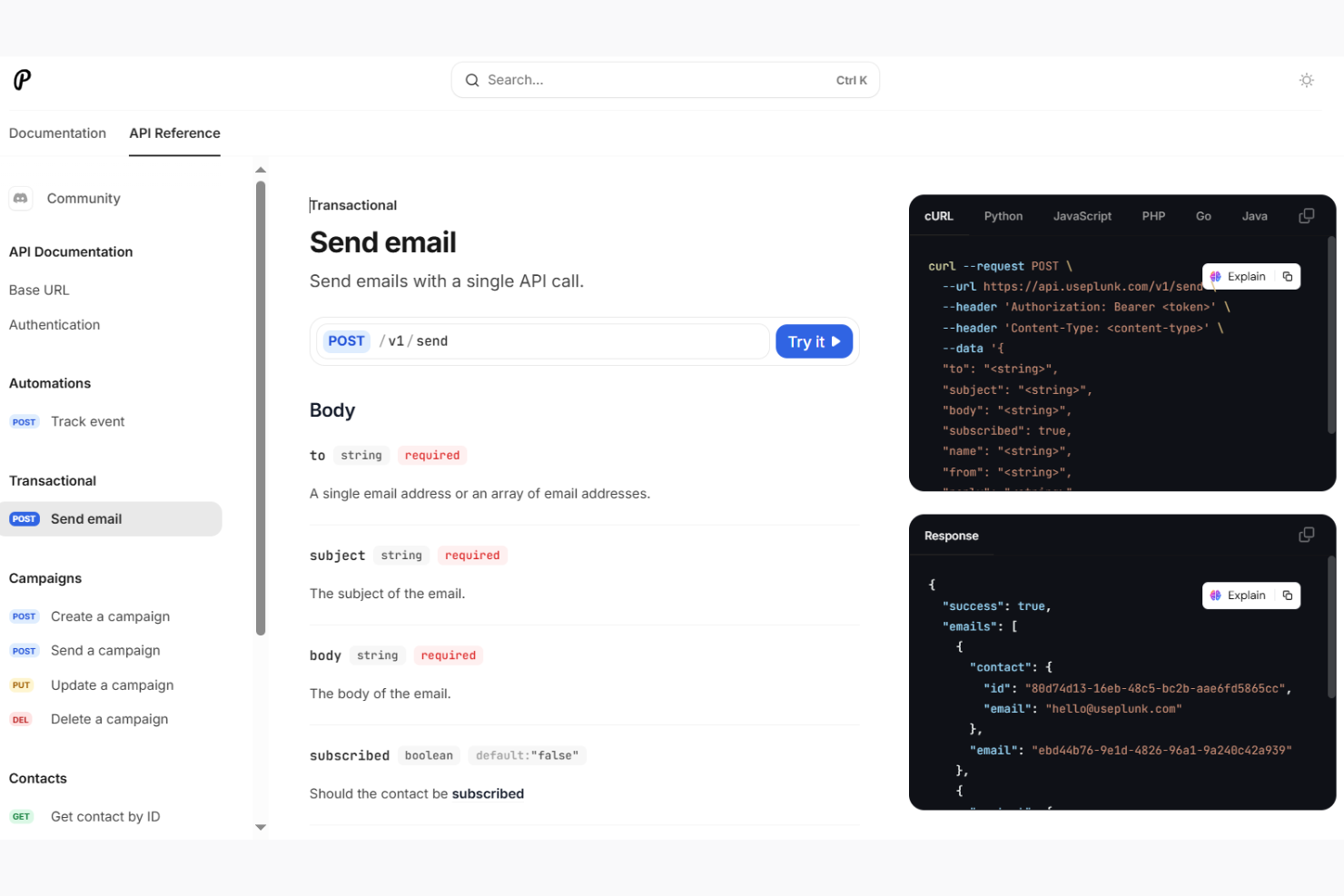
Keila earns a spot on my shortlist because it's one of the only open source ESPs that puts privacy and compliance front and center. I recommend it when teams handle sensitive lists or operate in regions with strict privacy rules—Keila’s built-in GDPR features and data residency controls are a big factor here.
What stands out for me is how Keila doesn’t rely on third-party processors or tracking, so sending campaigns feels truly private. I like how straightforward managing subscriber consent is, and I’ve had success using Keila when privacy isn’t just a checkbox, but a core requirement for every email sent.
Keila’s Best For
- Organizations that need GDPR compliance and strong data privacy for email campaigns
- Teams handling sensitive subscriber data and requiring clear consent management
Keila’s Not Great For
- Marketers who want advanced automation or dynamic content personalization
- Teams that rely on detailed tracking analytics and built-in third-party integrations
What Sets Keila Apart
Keila approaches email marketing by putting privacy first and stripping out tracking features you’ll find in tools like Mailchimp or Sendinblue. The workflow assumes that compliance isn’t an afterthought—handling data ownership, subscriber consent, and analytics privacy from the ground up. Instead of building in heavy automations, Keila expects you to focus on transparent, respectful communication. Compared to traditional ESPs that embed third-party pixels everywhere, Keila’s design trusts you to prioritize your recipients’ privacy above everything else.
Tradeoffs with Keila
By optimizing for privacy and giving up behavioral tracking and advanced automations, Keila limits what you can do with targeting and optimization. That means teams who expect real-time engagement metrics or detailed audience segmentation usually feel held back by the platform’s simple, privacy-focused approach.
Pros and Cons
Pros:
- Offers flexible form builder with anti-bot measures.
- Support depends on community resources rather than dedicated service.
- Provides advanced data segmentation for targeted email campaigns.
Cons:
- Limited native integrations, relying on API for connections.
- No built-in drag-and-drop email builder, requiring technical setup.

My Evaluation Score
- Analytics & Tracking
- Adequate
- Email Template Editor
- Adequate
- Open Source Licensing
- Strong
- Campaign Creation & Sending
- Strong
- Subscriber & List Management
- Adequate
- SMTP/Email Delivery Integration
- Strong
Plunk makes my list because it takes a single-solution approach to email management that solves a real pain point for teams tired of stitching together multiple tools. I gravitate to Plunk when a team wants everything from email collection to broadcast and analytics in one place, right out of the box.
What stands out for me is how Plunk handles opt-in management and subscriber lists without adding complexity or extra systems. I appreciate how quickly I can go from setting up a campaign to reviewing detailed performance insights—especially when I’m aiming for minimal-tool overhead without sacrificing functionality.
Plunk’s Best For
- Teams that want a single platform for list management, sending, and reporting
- Businesses looking to minimize complexity around email campaign setup and audience handling
Plunk’s Not Great For
- Marketers who want advanced automation, personalization, or multi-channel workflows
- Teams focused on building highly customized or segmented email journeys
What Sets Plunk Apart
What I notice about Plunk is how it strips down email marketing to its bare essentials—there’s a sense of intentional minimalism baked into every decision. Unlike something like Mailchimp, which tries to serve as a catch-all for every stage and use case, Plunk expects you to focus just on building your list, sending campaigns, and reviewing results in one spot.
It’s clear Plunk was built for teams that prefer working from a single system without the footprint of plugins, API management, or extra dashboard noise. Where more modular tools encourage modular workflows, Plunk is betting that most small and mid-sized teams need one clean, unified space for email—and little else.
Tradeoffs with Plunk
Plunk optimizes for simplicity and single-platform focus, but that comes at the cost of advanced sequencing, automation, and integration flexibility. What usually happens is, once your campaigns require nuanced triggers or personalized journeys, you’ll outgrow what Plunk is willing to offer.
Pros and Cons
Pros:
- Responsive email editor
- Privacy-focused data handling
- Transparent operations
Cons:
- Limited to EU data hosting
- Limited integrations
Other Open Source Email Marketing Software
Here are some additional open source email marketing software options that didn’t make it onto my shortlist, but are still worth checking out:
- Octeth
For agency email campaigns
- SendPortal
For developer-friendly email marketing
- Mautic
For marketing automation flexibility
- SendBlaster
For offline email campaigns


How I Evaluate Open-Source Email Marketing Software
I split my research into two layers: baseline criteria covering self-hosting, SMTP delivery, and subscriber management, and differentiators that reveal which tools are worth the setup.
Core Functionality (Table Stakes For This List)
When I'm selecting tools for my list, I rank each one on a scale from 0 (does not offer the functionality) to 5 (excels in this area) for each core functionality listed below. Then, I calculate the tool's total score into a percentage. Each tool needs to achieve a minimum total score of 65% to be considered for inclusion.
- Open Source Licensing: I check that each tool carries a recognized open source license and a publicly accessible repo, similar to how Mautic publishes under GPL or listmonk under AGPL.
- Campaign Creation & Sending: Each platform should let you build, schedule, and send bulk campaigns with personalization tokens and audience targeting built into the workflow.
- Subscriber & List Management: I evaluate how the tool handles imports, segmentation, custom fields, and unsubscribe processing, especially for teams managing lists across multiple products or regions.
- SMTP & Delivery Integration: The platform should connect with external providers like Amazon SES, Mailgun, or a private Postfix server, giving your team control over sending infrastructure and costs.
- Email Template Editor: I look at whether you get a visual editor, raw HTML access, or both, and how easy it is to build responsive, branded templates without a front-end developer.
- Analytics & Tracking: Reporting should cover opens, clicks, bounces, and unsubscribes at minimum so you can measure campaign performance and clean your lists over time.
Once I have a list of tools that meet this criteria, I consider what sets each platform apart.
Differentiating Factors (What Sets Vendors Apart)
Here's how I compare and contrast different vendors:
Standout Features
Marketing automation workflows separate basic newsletter senders from platforms you can grow with. I look for visual builders that let you trigger drip sequences based on subscriber behavior, like sending a re-engagement series when someone stops opening emails. API and webhook support matters just as much, since most teams need to sync subscriber data with a CRM or e-commerce platform. I also evaluate deliverability tooling, including built-in DKIM/SPF configuration and bounce handling, because even the best campaign won't perform if it lands in spam.
Beyond Features
Community and ecosystem health tells you a lot about a platform's long-term viability. I check GitHub activity, documentation quality, and whether there's an active forum or Discord where you can troubleshoot issues without paid support. Compliance tooling is another key factor—I evaluate whether the platform includes double opt-in, consent tracking, and data deletion workflows that teams need for GDPR and similar regulations. Deployment flexibility also matters, especially Docker and one-click installer availability, since a painful setup process can stall adoption before you even send your first campaign.
How to Choose Open Source Email Marketing Software
It’s easy to get bogged down in long feature lists and complex pricing structures. To help you stay focused as you work through your unique software selection process, here’s a checklist of factors to keep in mind:
| Factor | What to Consider |
| Scalability | Consider if the software can grow with your business. Will it handle more subscribers and emails as your needs increase? Look for options that won't limit growth. |
| Integrations | Check if it connects with your current systems. Does it work with your CRM, analytics, and other tools? Avoid software that isolates your data. |
| Customizability | Think about how much you can tailor the software to fit your processes. Are templates and workflows adaptable? Balance flexibility with ease of use. |
| Ease of use | Evaluate the learning curve for your team. Is the interface intuitive? Test with a trial to ensure it won't slow down your operations. |
| Implementation and onboarding | Assess the time and resources required to get started. Are there guides or support to help you? A smooth start can save headaches later. |
| Cost | Compare the pricing against your budget. Are there hidden fees or limits on usage? Ensure the cost aligns with the value it provides. |
| Security safeguards | Verify the software's security measures. Does it protect your data and comply with regulations? Look for encryption and regular updates. |
| Support availability | Determine the level of support offered. Is help available when you need it? Consider the importance of customer service in your decision. |
What Is Open Source Email Marketing Software?
Open source email marketing software is a tool that allows users to manage and send email campaigns with the freedom to modify the software's source code. Marketing professionals, small business owners, and developers often use these tools to customize their email strategy while saving costs. Features like list management, automation, and detailed analytics support personalized and efficient marketing efforts. These tools provide flexibility and control, allowing users to tailor their email campaigns to specific needs and goals.
Features of Open Source Email Marketing Software
When selecting open source email marketing software, keep an eye out for the following key features:
- Customizable email templates: Quickly design professional-looking emails using pre-built templates that you can tweak to match your brand or campaign needs. You can save time and ensure every message feels uniquely yours.
- Campaign automation: Set up automated workflows for welcome emails, drip series, or re-engagement campaigns. This lets you send the right message at the right time, even while you're busy doing other things.
- Subscriber management: Easily organize, segment, and track your subscriber lists, so you can send targeted content and keep your audience engaged without any hassle.
- Detailed analytics and reporting: Track open rates, click-throughs, bounces, and other key metrics. With these reports, you know what’s working and where you can improve your campaigns.
- A/B testing: Run split tests on subject lines, email content, or sending times. Learning what makes your audience tick helps you boost response rates in a measurable, low-stress way.
- Integration options: Connect your email platform with other tools you use, like CRMs or web forms. Streamlining data flow saves you time and makes sure nothing falls through the cracks.
- Contact import/export: Bring in lists from other sources or export your contacts for use elsewhere, making migration or data analysis quick and painless.
- List segmentation: Divide subscribers based on demographics, behavior, or engagement history, so you can tailor campaigns that really hit home for each group.
- Unsubscribe management: Automatically handle opt-outs and compliance with ease. Focus more on connecting with interested readers and less on manual list maintenance.
Common Open Source Email Marketing Software AI Features
Beyond the standard open source email marketing software features listed above, many of these solutions are incorporating AI with features like:
- Automated list cleaning: AI identifies inactive subscribers, spam traps, or potential bounces before you hit send, protecting your sender reputation and keeping your list fresh.
- Predictive send-time optimization: AI analyzes subscriber behavior to suggest the best times to send emails, helping you land in inboxes when your readers are most likely to engage.
- Content personalization: AI tailors email content—like product recommendations or messaging—to each subscriber, driving up the chances they'll find value (and not just hit delete).
- Engagement scoring: AI tracks how subscribers interact with your emails and gives you a clear score for each, so you know who’s hot and who needs a little more attention.
- Smart subject line suggestions: AI suggests subject lines based on your email's content and past campaign performance, helping you craft headlines that boost open rates.
Benefits of Open Source Email Marketing Software
Implementing open source email marketing software provides several benefits for your team and your business. Here are a few you can look forward to:
- Cost savings: Save money by avoiding subscription fees and only spending on features you need.
- Flexibility: Adapt the software to fit your specific business needs with customizable features and open access to the source code.
- Control: Maintain complete control over your data and how it's managed, ensuring privacy and security.
- Scalability: Easily grow your email marketing efforts as your business expands without needing to switch platforms.
- Integration: Connect with other business tools to create a unified marketing strategy and improve efficiency.
- Community support: Benefit from a community of developers and users who contribute improvements and provide assistance.
- Transparency: Gain insights into how the software works, allowing for better troubleshooting and optimization.
Costs and Pricing of Open Source Email Marketing Software
Selecting open source email marketing software requires an understanding of the various pricing models and plans available. Costs vary based on features, team size, add-ons, and more. The table below summarizes common plans, their average prices, and typical features included in open source email marketing software solutions:
Plan Comparison Table for Open Source Email Marketing Software
| Plan Type | Average Price | Common Features |
| Free Plan | $0 | Basic list management, email templates, and community support. |
| Personal Plan | $5-$25/ user/month | Advanced list segmentation, basic analytics, and limited automation. |
| Business Plan | $30-$75/ user/month | Detailed reporting, enhanced automation, and multi-user access. |
| Enterprise Plan | $80-$150/ user/month | Customizable workflows, premium support, and integration with other enterprise tools. |
Open Source Email Marketing Software FAQs
Here are some answers to common questions about open source email marketing software:
Can I customize open source email marketing software to fit my needs?
Yes, you can customize open source email marketing software to fit your specific needs. The open-source nature allows you to modify the codebase and add features that suit your business. You or your development team can tailor the software to integrate with your existing systems, ensuring a seamless fit.
How secure is open source email marketing software?
Open source email marketing software can be secure if properly managed. You should ensure regular updates and patches are applied to protect against vulnerabilities. It’s also important to configure security settings correctly and use secure hosting environments to safeguard your data.
What kind of support is available for open source email marketing software?
Support for open source email marketing software often comes from community forums and user groups. Some vendors offer paid support plans for additional assistance. It’s beneficial to check if there’s an active community or if the vendor provides documentation and resources to help with troubleshooting.
Can open source email marketing software handle large subscriber lists?
Yes, many open source email marketing tools can handle large subscriber lists. You should verify the software’s scalability and performance capabilities before implementation. Consider testing with a sample list to ensure it meets your requirements for list size and email volume.
Are there costs associated with using open source email marketing software?
While the software itself is often free, there may be costs associated with hosting, support, and additional features. You might need to invest in technical expertise for customization and maintenance. It’s wise to budget for these potential expenses when planning your implementation.
How do I choose the right open source email marketing software for my business?
Choosing the right open source email marketing software involves evaluating your business needs and technical resources. Consider factors like scalability, customizability, and integration capabilities. It’s helpful to try demos or trials to assess usability and fit with your existing processes.